
Schedule smarter. Compare the top social media scheduling tools of 2026, see side-by-side features and pricing, and learn how to choose the right scheduler for your workflow.
When your to-do list is already longer than a TikTok scroll, switching between apps to post on social media adds unnecessary friction to your day. That’s why the most efficient creators and marketers rely on social media scheduling tools to batch content, stay visible, and actually log off.
I used to publish on the fly, too, but I’ve been converted to content batching. And after testing a dozen schedulers, I found what really matters — and what doesn’t.
Planning content in advance helps me stay consistent across platforms, free up time for other priorities, and keep growing my audience.
In this guide, you’ll find the social scheduling tools that make that possible, the features worth prioritizing in a post planner, and a simple framework for choosing the right fit — whether you’re a solo creator or a busy social media manager.
Key takeaways
- Must-have features: Look for a visual content calendar, bulk scheduling capabilities, a unified social inbox, and robust analytics.
- Efficiency: Transitioning from "on-the-fly" posting to content batching via a scheduler reduces burnout and ensures consistent brand presence.
- Pricing: Options range from free plans (Buffer, Metricool) to premium enterprise seats (Sprout Social at $199+ per month).
Jump to a section:
- What are social media scheduling tools?
- Key features to look for in the best social media scheduling tools
- The best social media scheduling tools in 2026
- How to choose the right social media scheduler
- Scheduling is not just a tactical advantage
- Social media scheduling FAQs
- More social media scheduling resources
What are social media scheduling tools?
Social media scheduling tools are apps or dashboards that let you schedule social media posts ahead of time. Your posts will then go live automatically on the date you choose.
This is especially handy if you're managing multiple social channels. Instead of hopping into five different apps to hit “Publish,” you load everything into one queue and let the software handle the delivery across most social media platforms.
This shift allows you to focus on high-level tasks rather than last-minute admin:
- Strategy and creativity: Focus on what to post, not when to post.
- Community management: Spend more time engaging and less time uploading.
- Predictability: Turn a scattered to-do list into a streamlined posting schedule.
Creators, small businesses, and social media marketers use schedulers to save time, stay consistent, and create breathing room in their day.
Most social media management tools come with:
- A visual content calendar or post planner for drag-and-drop rescheduling
- Bulk upload options so you can schedule a week (or month) in minutes
- AI writing assistants to generate post ideas or tweak copy on the fly
- Approval workflows and user roles for teams
- A unified inbox for comments and DMs
- Built-in social media analytics to show what’s working
Key features to look for in the best social media scheduling tools
Not every scheduler is built for every workflow. A solo creator may only need a simple queue, while an agency juggling multiple social networks will crave deeper collaboration and analytics. Keep an eye on these key features before you commit.
1. Content calendar and post planner
A drag-and-drop calendar gives you a bird's-eye view of everything you've scheduled, so you can easily adjust timing or swap posts around when plans change. The built-in post planner is where ideas live until you assign them a date, platform, and final caption.
2. Bulk scheduling + approval workflows
If you create content in batches, you'll want the option to schedule multiple posts at once. Bulk upload CSVs or drop in a folder of assets, set dates, and hit schedule. If you work with teammates or clients, layered approval workflows (draft → review → publish) prevent late-night “Can we pull that?” messages.
3. Unified inbox and collaboration features
A single social inbox feature for DMs, comments, and mentions across all connected profiles keeps community management tidy. With shared drafts, internal notes, and role permissions, your team can collaborate smoothly without endless Slack threads or email chains.
4. Media library and mobile support
A searchable media library stores brand assets, user-generated content, and evergreen graphics so you don’t have to hunt down that logo for the hundredth time. The top schedulers mirror nearly all desktop functions on a phone, so you can schedule posts or swap captions from anywhere.
5. Social media analytics and performance tracking
Planning is just the start. Tracking what works helps you refine your strategy over time. Look for built-in social media analytics like reach, engagement, and click-throughs so you can refine your social media strategy, double down on winners, and retire the duds.
Smart AI helpers are quickly becoming table stakes. They won’t replace your strategy, but they will shave hours off the admin.
Focus on these five areas, and you’ll find a scheduler that grows with you, whether you’re managing one brand or multiple accounts.
The best social media scheduling tools in 2026
You've got plenty of scheduling tools to choose from, and each one takes a different approach to helping you stay consistent online.
Below, we’ve pulled together a list of standout tools for creators, small businesses, and growing teams who want to schedule content, stay consistent, and save time across multiple social media platforms.
Quick comparison of social media scheduling tools
|
Best for |
Starting price |
Free plan |
Content calendar |
Bulk scheduling |
Approval workflows |
|
| Buffer | Creators and small teams | $5 /mo per channel | ✔ | ✔ | ✔ | ✔ |
| Sprout Social | Enterprise brands and agencies | $199 /mo per seat | ✖ | ✔ | ✔ | ✔ |
| Later | Visual-first IG/TikTok planners | $18.75 /mo | ✔ | ✔ | ✖ | ✔ |
| Hootsuite | Cross-platform scheduling at scale | $199 /mo (Standard) | ✖ | ✔ | ✔ | ✔ |
| SocialBee | Evergreen and curated queues | $24 /mo | ✖ | ✔ | ✔ | ✔ |
| Metricool | Data-driven marketers | $18 /mo (Starter) | ✔ | ✔ | ✔ | ✔ |
| Planable | Client approvals and collaboration | $33 /mo per workspace | ✔ | ✔ | ✖ | ✔ |
Buffer
Best for consistent, stress-free scheduling
I'm starting with Buffer because it's what I use daily, and I've seen firsthand how it helps creators stay consistent without the overwhelm. I'm definitely biased here as a Bufferoo, but I've used loads of tools in the past and have to test new ones as part of my job. Buffer, without fail, offers the smoothest experience.
As a creator with a thriving presence on LinkedIn, I depend fully on Buffer to keep me organized and consistent. As someone who creates content for Buffer, I also get to see how the team builds features based on what creators actually need.
Standout features of Buffer:
- Schedule posts to multiple social media platforms in one queue
- Park ideas in the Create Space planner, then add them to the calendar when you’re ready
- Upload a week (or month) of content in minutes
- Posting Goals and Streaks keep you on track and motivated
- Approval workflows and workspaces to separate multiple brands or clients
- Unified inbox, Community, to reply to comments without hopping apps
- Built-in social media analytics for reach, clicks, and engagement
- Posting time recommendations based on our best time to post data
- Start Page link-in-bio builder
- AI Assistant helps you generate, refine, and repurpose social media content in seconds
- Several free mini-tools (hashtag generator, engagement analyzer, more)
Buffer keeps its focus tight — powerful scheduling, easy to learn, no feature bloat — so you can post consistently and move on to whatever's next.
Best for: Creators, consultants, small businesses
Free plan: Up to 3 channels
Try it today — start free or explore the free tools
Sprout Social
Best for large teams that need deep reporting and polished workflows
Sprout Social is an enterprise-grade social media management tool that layers robust social media publishing, listening, and analytics on top of a reliable social media scheduler.
It comes with a higher price tag, but agencies and larger teams often find the investment worth it for the visibility and control they get across accounts and stakeholders.
Features of Sprout:
- Schedule posts to every major network, then refine timing with recommended send-time windows
- Granular approval workflows (multi-step, multi-role) so nothing goes live without the right sign-off
- Real-time social media listening dashboards to track brand mentions, competitors, and industry keywords
- Advanced analytics: tag-level reporting, campaign tracking, and exportable PowerPoint or CSV reports
- Task assignments, internal notes, and chat-style comments for smooth collaboration
- Unified inbox merges comments, DMs, and reviews from most social media platforms into one stream
- Premium add-ons for chatbot automation and paid social reporting
Sprout offers a 30-day trial but no free plan. Paid tiers start around $199 per user per month, so costs climb fast as you add seats. If you're working with a smaller budget, tools like Buffer or Metricool offer powerful scheduling and analytics without the enterprise price tag.
Best for: Agencies, enterprise brands, data-driven social media managers
Free plan: No (30-day trial available)
Later
Best for visual planners and Instagram-first creators
Originally built for Instagram, Later is a strong choice for brands that prioritize visual planning and grid aesthetics. Its drag-and-drop content calendar shows your grid exactly as it will appear, so you can keep a flawless look across visual-heavy social platforms like TikTok, Pinterest, and YouTube.
Features of Later:
- Schedule posts to multiple channels
- Central media library for images, reels, and user-generated content
- Grid preview to plan launches and maintain brand aesthetic
- Basic social media analytics for top-performing posts and optimal send times
- Built-in hashtag suggestions and caption templates to save time
- Linkin.bio turns your Instagram bio into a shoppable mini-site
- Fully featured mobile app for on-the-fly edits from any mobile device
One caveat is that Later’s free plan limits monthly posts per profile, and there’s a limited inbox (the inbox currently covers Instagram, Facebook, and TikTok only). Collaboration features are lighter than Buffer or Sprout, so larger teams may feel constrained.
Best for: Instagram-first creators, influencers, and brands focused on visual content
Free plan: Yes (limited posts per month)
Hootsuite
Best for cross-platform scheduling at scale
One of the original social media schedulers, Hootsuite is still a solid choice when you need one dashboard to manage multiple profiles. The interface uses streams and tabs to organize everything, which gives you a lot of control once you learn your way around — though it can feel overwhelming at first if you prefer a simpler layout.
Features of Hootsuite:
- Schedule posts to virtually every channel, then fine-tune timing in a flexible content calendar
- Multi-column streams to monitor keywords, mentions, and customer DMs in real time
- Unified inbox for replying to comments and messages across networks
- Bulk scheduling via CSV upload — great for high-volume campaigns
- App directory (over 150 integrations) for design, CRM, and help-desk tie-ins
- Built-in social media analytics for post- and campaign-level performance
One thing to keep in mind: there's no free plan. Paid tiers start at $199 per month and climb as you add seats. The interface is dense, so solo creators or teams who just need a lean social media scheduler may prefer Buffer or Later.
Best for: Larger teams and marketers scheduling across many platforms at once
Free plan: No (30-day trial available)
SocialBee
Best for evergreen content and curated post libraries
If your strategy relies on evergreen content — tips, testimonials, curated articles — SocialBee helps keep your queue full without requiring new posts every day. Its category-based engine lets you group updates — “Tips,” “Case Studies,” “Promos” — and set cadence rules, producing a balanced social media posting schedule that runs on autopilot.
Features of SocialBee:
- Tell it how often to publish each bucket, then let it rotate through your library
- One-click recycling for evergreen posts, perfect for squeezing more value from long-form content
- Built-in content curation tools to pull articles or RSS feeds straight into the queue
- Visual media library to store brand assets, GIFs, and Canva designs
- Schedule to multiple channels from one dashboard
- Light approval workflows and workspaces for small teams or VA support
- Basic analytics for reach and engagement, plus AI copy helper to save time on captions
One thing to note: The interface isn't as modern as some newer tools. Power users who need real-time engagement or on-the-go edits might pair it with other social media tools.
Best for: Solo marketers, coaches, consultants, and creators who post evergreen or curated content
Free plan: No (14-day free trial available)
Metricool
Best for data-driven scheduling and competitive insights
If you want a scheduling tool with built-in analytics, Metricool is worth considering. It supports every major network, then layers real-time data and competitor analysis on top of a visual content calendar.
Features of Metricool:
- Schedule content to multiple social networks from one queue
- Map campaigns in a drag-and-drop calendar, then recycle evergreen posts automatically
- Live dashboard shows reach, clicks, and top content across all social media accounts
- Built-in competitor analysis and industry benchmarks to spot gaps
- Direct scheduling to Google Business Profile (updates, offers, reviews)
- Hashtag suggestions, AI post rewriter, and bulk CSV upload to save time
- Shared workspaces for client or team collaboration
One of Metricool’s standout features is its real-time analytics dashboard, which gives you a clear picture of what’s working across all your platforms. It also includes a hashtag suggestions tool, content recycling features, and basic AI capabilities for repurposing posts.
The free tier (20 posts per month) is generous for testing, but heavier users will need the Starter plan (~$18 per month).
Best for: Data-driven marketers, social media managers, and brands focused on performance and optimization
Free plan: Yes (limited to 20 posts per month)
Planable
Best for fast, visual collaboration and client approvals
For agencies, freelancers, or in-house teams that live and die by feedback loops, Planable turns the approval slog into a real-time conversation. Its feed-style interface previews posts exactly as they’ll appear on each network, so clients can react, comment, and sign off without endless PDFs or email chains.
Features of Planable:
- Schedule content and preview it in a live-feed view
- Pixel-perfect, interactive content calendar — drag and drop posts, carousels, or reels into place
- Threaded comments, version history, and emoji reactions for friction-free collaboration features
- Multi-level approval workflows (none, optional, required) to match each client’s process
- Organize campaigns by brand, product launch, or social platform in tidy workspaces
- Invite stakeholders as “external reviewers” so they can approve posts without full dashboard access
- Light mobile app lets you review and approve from any mobile device
Planable focuses on planning and approvals. Pair it with another social media management tool if you need deeper reporting or engagement tracking.
Best for: Freelancers, agencies, and content teams that need fast, visual collaboration and approval
Free plan: Yes (limited to 50 posts)
How to choose the right social media scheduler
With so many scheduling tools available, the goal isn't to find the most powerful option. It's to pick the one that fits your workflow, goals, and preferred channels. Use these five questions to narrow down your options.
1. Start with your posting routine
Do you post daily, or do you prefer to create content in batches once a week? Do you want to publish across multiple social media platforms, or focus on just one or two?
- If you post in bursts and want to schedule content in bulk, look for tools with bulk scheduling, content calendars, and category-based queues.
- If your content is visual and platform-specific, you might prefer a planner with visual previews.
2. Think about your team (or lack of one)
Your ideal tool depends on who’s involved in your publishing process.
- Solo creators and founders typically need speed: an intuitive interface, AI assistance, and a solid mobile app. Tools like Buffer and Metricool are built with that in mind.
- Teams or agencies should prioritize multi-brand workspaces, role-based approval workflows, and collaboration chat (Sprout Social, Planable).
3. Match the tool to your platforms
Some schedulers support all the main social media platforms, while others focus on specific ones.
- If Google Business Profile is part of your content strategy, you’ll want tools that can publish directly to it.
- If your primary platform is Instagram or TikTok, a visual-first tool may work better.
- Managing multiple social networks? Hootsuite’s broad integrations or Buffer’s simple workspace switcher keep everything in one tab.
4. Look beyond publishing
Scheduling is step one; great social media management tools also help you save time on:
- Idea storage and draft copy
- Built-in social media analytics for performance loops
- A unified inbox for community replies
- Content curation tools for repurposing wins
- AI assistance for caption tweaks and best-time suggestions
5. Check the pricing model
Free tiers are perfect for trial runs, but costs can spike once you add multiple social media profiles or extra collaborators.
Ask yourself:
- How many channels will I connect in the next 6–12 months?
- Do clients or teammates need log-ins?
- Is analytics a must-have or a “nice someday”?
Scheduling is not just a tactical advantage
Social media scheduling tools do more than help you post on time. They give you space to think strategically, create better content, and show up consistently — even when life gets busy.
By removing the daily pressure of manual posting, you gain the freedom to:
- Think clearly: Make data-backed content decisions.
- Maintain momentum: Stay visible even when you are offline.
- Avoid burnout: Reclaim your personal time without sacrificing growth.
The right scheduler doesn't just help you post more often — it helps you work more intentionally and create space for what matters most. It turns content from a daily drain into a renewable asset — one that works for you in the background, while you focus on the parts of your business (and life) that need you most.
If you've been posting on the fly, this might be the nudge you need: scheduling isn't just for highly organized marketers. It's for anyone who wants to stay consistent without the stress.
Social media scheduling FAQs
What is the best scheduling tool for social media?
There isn’t one “best” scheduler for everyone. List your must-have features — supported channels, drag-and-drop calendar, analytics, price — then test a few options. Buffer is a solid pick for creators and teams because it’s easy to use and free for up to three channels.
What is the best social media calendar tool?
A strong calendar tool lets you drag-and-drop posts, color-code campaigns, and see every channel at a glance. Buffer’s built-in calendar covers all three and syncs across desktop and mobile, so you can tweak your lineup anywhere.
What is the best social media post scheduler?
For consistently scheduling posts across platforms like Instagram, LinkedIn, and Google Business Profile, Buffer is one of the most reliable tools. It combines scheduling, analytics, and collaboration — without the bloat.
What is the best social media calendar planner?
Look for a planner that shows scheduled posts alongside drafts and ideas, with quick rescheduling and team notes. Buffer rolls those features into its content planner, so you can move posts around without spreadsheets.
How do I schedule out social media posts?
Most scheduling tools follow a similar workflow:
- Connect your social media accounts (like Instagram, LinkedIn, Facebook)
- Upload your content or create it directly in the tool
- Choose your date and time — or use suggested posting times
- Preview your post (optional), then hit Schedule
Tools like Buffer make this especially easy with features like post drafts, queues, and scheduling from mobile.
Is Hootsuite no longer free?
As of 2025, Hootsuite no longer offers a free plan. All plans now start at $199 per month, though a 30-day free trial is available. If you're looking for free or lower-cost alternatives, Buffer and Metricool both offer generous free plans with solid scheduling features.
More social media scheduling resources
- 2 Ways to Schedule YouTube Shorts — For Free
- How to Schedule Tweets: When to Post, What to Use, and How to Do It Right
- How to Schedule Instagram Stories (2 Easy Methods + Tips)
- 20+ Top Social Media Sites and Platforms to Grow Your Brand
- The 7 Best Social Media Monitoring Tools
Recommended Story For You :
Organize Keywords and Import CSV Files from the Google Keyword Planner
The Most Affordable And Easiest User Friendly Page Builder You Will Ever Use!

Instant WordPress Theme That Matches Your Website
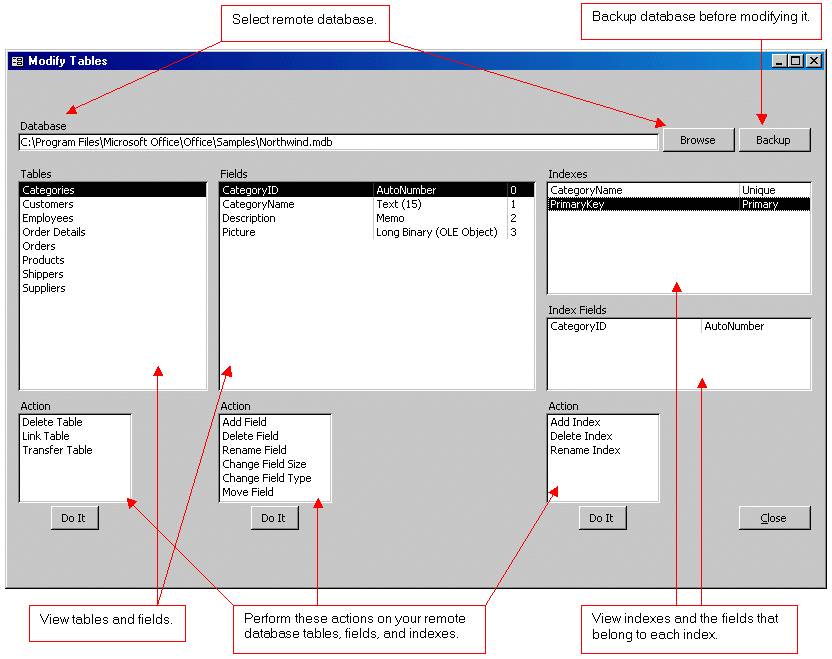
Wizard to Manage Remote Backend MS Access Database Tables Fields and Indexes

If you had an aisle-by-aisle grocery list wouldn't you spend less money on impulse items?
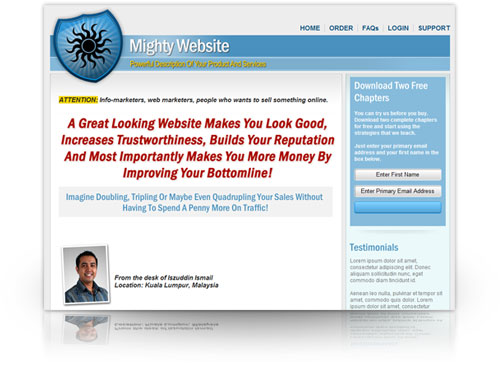
everything you need to create a professional corporate look mini-site is there.

Unlock Your Networking Potential with GNS3Vault
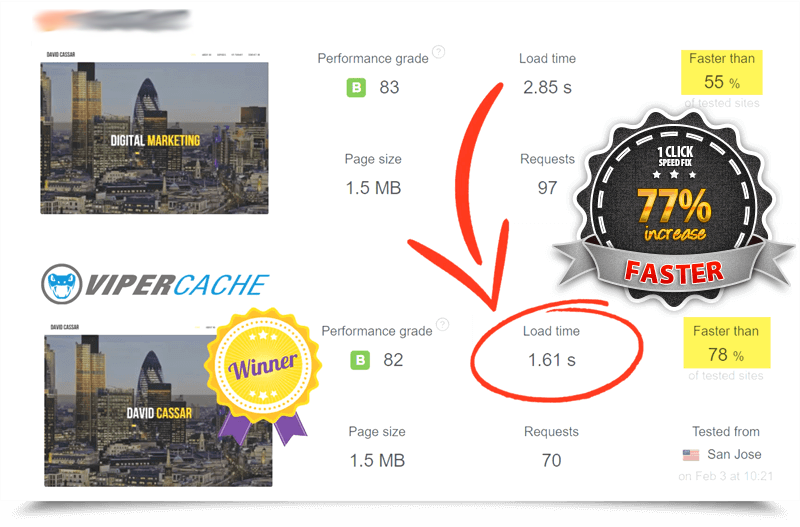
Viper Cache Was 77% Faster Than The Competetion

Understanding Stock Market Shorting eBook